Your Projections Will Fail — Make Them Resilient
Decouple projections from command handlers with async execution. Learn self-healing, failure isolation, batching, and polling in Ecotone's ProjectionV2.

There is a design decision that separates projections that recover from crashes automatically from projections that need manual intervention every time something breaks: does the projection process the event message it received directly, or does it use that message as means to fetch Events from the Event Store?
Simple projection systems process the message directly. If Message is lost, or handled in parallel, there is a big chance the order will be lost, and Read Model will end up being incorrect. To recover we would need to manually reset and replay.
On the other side, Projections that always tracks their current committed position — get self-healing for free. And in this article, I will show what we can build on top of such architecture: async execution, failure isolation, batching, and recovery that does not require manual intervention at 3 AM.
Each Projection Keeps Its Own Bookmark
Position tracking is the core concept in Event Sourcing projections. Every projection has its own position tracker — a small record that remembers the number of the last event it handled. After it successfully processes an event, the projection
stores the updated position so that next time it runs, it knows where to resume. Keeping and persisting that position is what makes a projection recoverable at all.
The position tracker is per-projection, not global. Three projections reading the same stream will each track their position independently. One might be caught up at event #100. Another at #87 because it is slower. A third stuck at #42 because it
keeps crashing on a bad event.
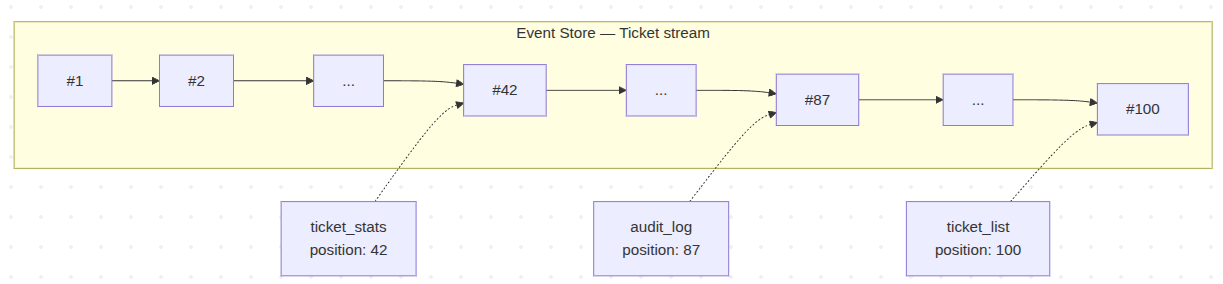
When a projection runs, it reads its position, asks the Event Store for everything after it, and processes forward. When it commits, the position advances. If it crashes, the position stays where it was — the events are still in the store, unchanged, waiting.
This per-projection position tracker is the seed for everything that follows. Self-healing works because the projection knows exactly where it stopped. Failure isolation works because each projection fails against its own position, not a shared one. Batching works because the position can be committed every N events instead of every one.
The rest of this article is about what becomes possible once you have that foundation.
Breaking the Coupling
Let's start by discussing synchronous (often called inline) vs asynchronous Projections. When a projection runs synchronously inside your command handler, everything is coupled. Performance, reliability, failure propagation – all of it.
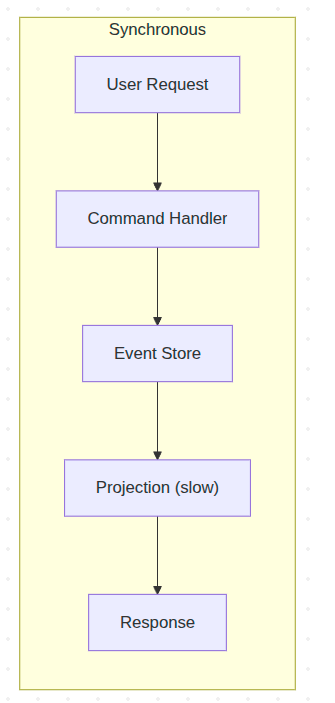
Assume three projections triggered by the same event. One has a bug. In synchronous mode, that one broken read model rolls back the entire command handler transaction. A perfectly valid business operation fails because of a reporting dashboard. The fix is to break the coupling entirely.
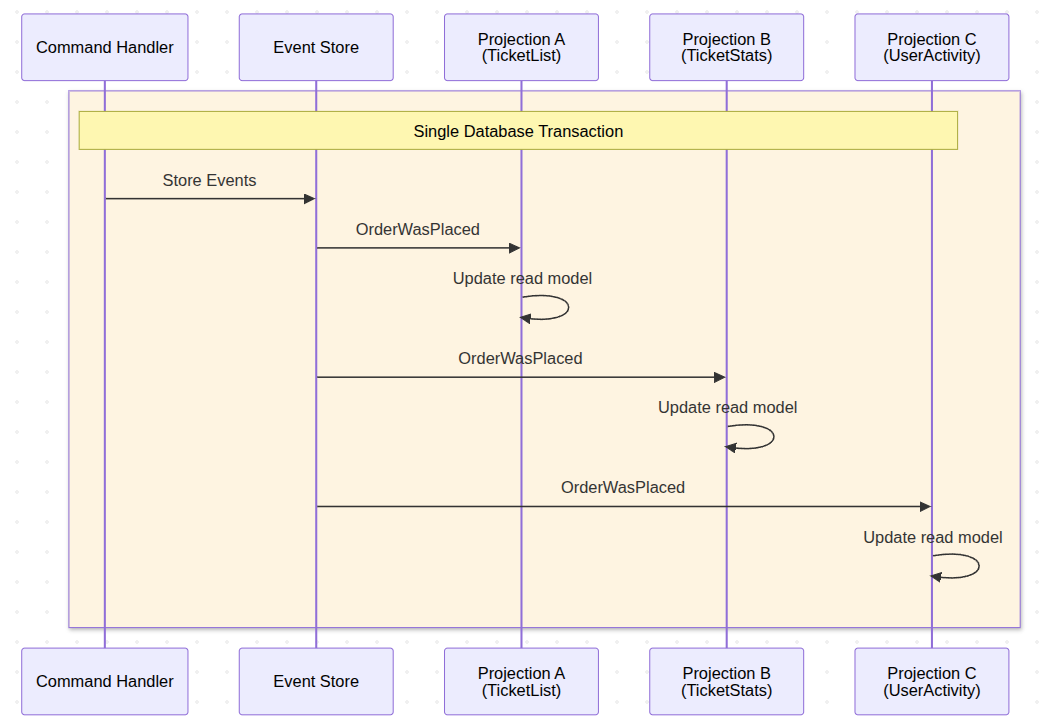
This gives us immediate consistency, as Projections are always up to the date with Events in Event Store. However consequence of this is lack of failure isolation, as when one Projection fails it roll-backs changes to other Projections and to storing the original Event itself.
Let's consider however what would happen if we would make those Projections Asynchronous.
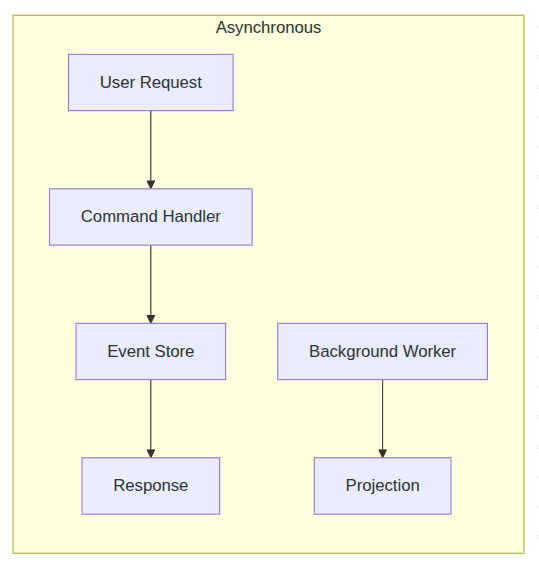
Take the exact same projection and add one attribute:
#[Asynchronous('projections')]
#[ProjectionV2('ticket_list')]
#[FromAggregateStream(Ticket::class)]
class TicketListProjection
{
    public function __construct(private Connection $connection) {}

    #[EventHandler]
    public function onTicketRegistered(TicketWasRegistered $event): void
    {
        $this->connection->insert('ticket_list', [
            'ticket_id' => $event->ticketId,
            'ticket_type' => $event->type,
            'status' => 'open',
        ]);
    }

    #[EventHandler]
    public function onTicketClosed(TicketWasClosed $event): void
    {
        $this->connection->update(
            'ticket_list',
            ['status' => 'closed'],
            ['ticket_id' => $event->ticketId]
        );
    }
}
A standard synchronous projection — the only change to make it async is the #[Asynchronous] attribute.
That is it. The projection code is identical. The lifecycle hooks stay the same. You add #[Asynchronous('projections')] and the projection moves from synchronous in-process execution to a background worker. You configure a message channel, start a worker with bin/console ecotone:run projections, and the projection processes events in the background.
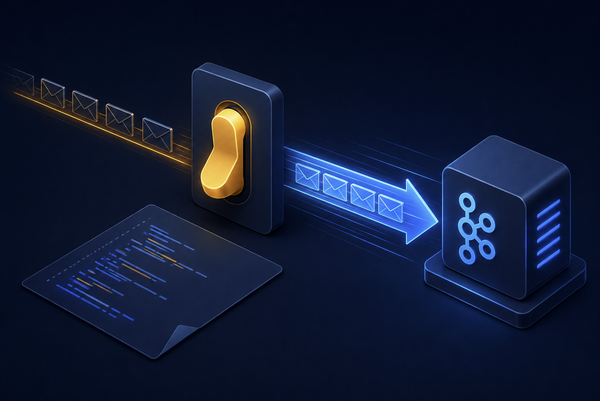
Now when an event is published, it gets delivered to the message channel. The worker picks it up and triggers the projection. But – and here is that key insight again each projection does receives it's own copy of the Event - and is being triggered in full isolation.
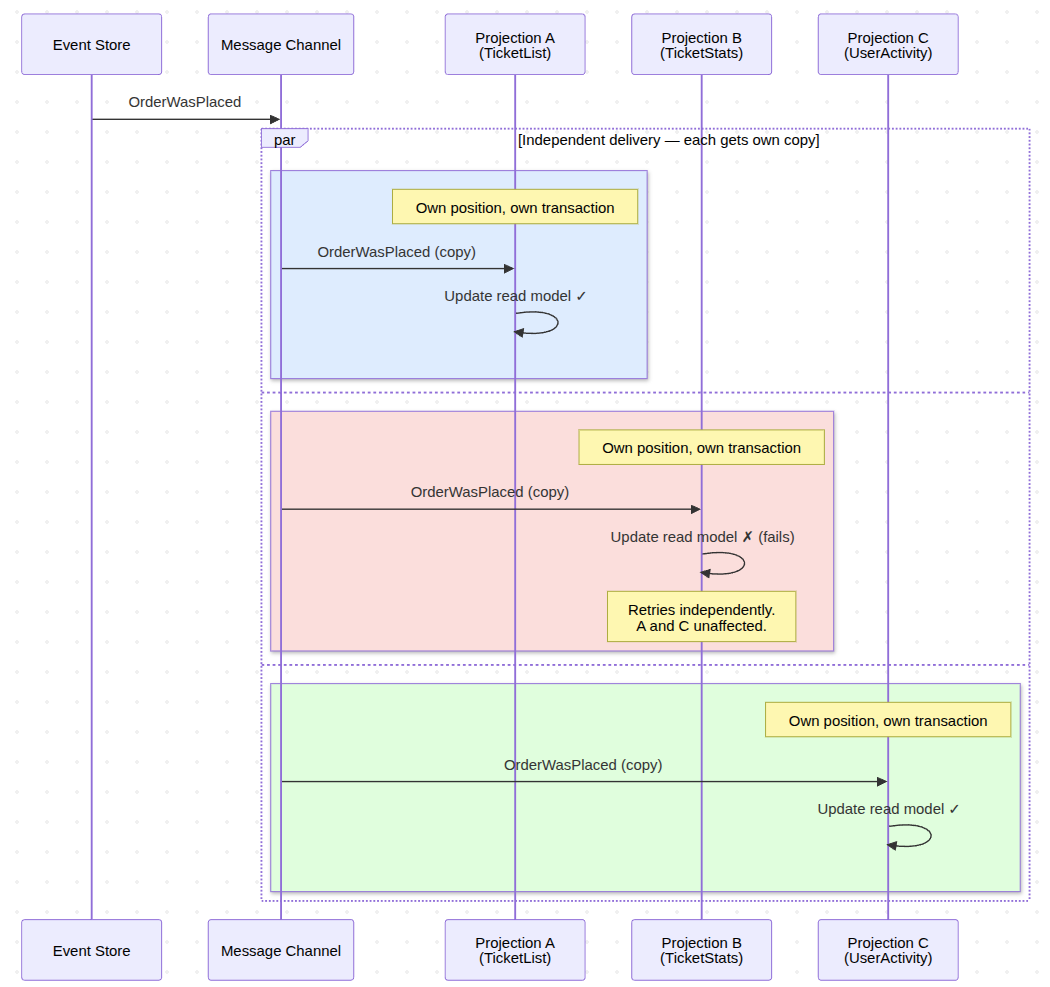
After consuming Event from the Channel, Projection goes to the Event Store and fetches all events starting from its last committed position. The message is just a nudge. "Something happened. Go check."
Now let's discuss in more details what happens within single isolated Projection trigger during failure.
Self-Healing: To make our lifes easier
Your TicketListProjection has been running fine for days, processing events up through position 41. Then event #42 arrives. A TicketWasRegistered with a ticket type that is 30 characters long. Your database column allows 25.
The projection crashes.
The failed batch rolls back. The projection's position stays at 41. Events #43, #44, #45 keep arriving in the Event Store. Tickets are being created, closed, updated. Business continues. But the trigger messages keep coming into the channel, and every attempt to process fails on event #42. The retry logic kicks in -- once, twice, three times. Same crash every time.
With the trigger-based approach which reads last successful projection position, recovery is: fix the column to VARCHAR(100), deploy.
The next trigger message arrives or we replay triggering Message from Dead Letter. The projection reads from the Event Store starting at position 41 – its last committed position. Event #42 processes successfully this time. Then #43. Then #44, #45, and everything else that accumulated overnight. The projection catches up automatically. No reset command. No backfill script. No data migration. No runbook.
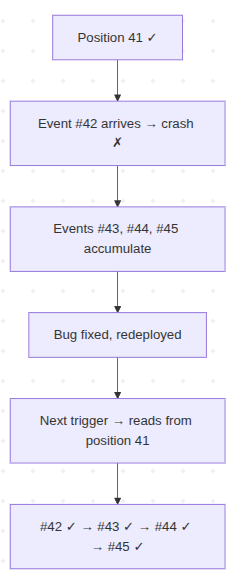
The projection resumes from its last committed position — no manual intervention needed
The system can be broken for hours, events kept flowing. And when we are ready recovery will be: fix the code, deploy, done. The Event Store is your source of truth, events are never lost - The projection simply picks up where it left off and continues.
Now let's discuss how smaller batches can ensure our Projection won't crash once we reach certain limit of events.
Batching: Lock Duration and Memory Are the Real Enemy
You deploy a new projection to a system that already has 500,000 events. The projection starts from position zero. Processing all of that in a single transaction locks your database tables for minutes and accumulates everything in memory. Without clearing state between batches, the process grows unbounded until OOM kills it — especially if you are using ORM, where the EntityManager holds references to every entity it has seen.
Ecotone solves both problems with configurable batch processing. It automatically flushes and clears the Doctrine Entity Manager (If we use it) at batch boundaries, preventing memory leaks during long catch-up runs:
#[Asynchronous('projections')]
#[ProjectionV2('ticket_list')]
#[FromAggregateStream(Ticket::class)]
#[ProjectionExecution(eventLoadingBatchSize: 500)]
class TicketListProjection
{
    public function __construct(
        private EntityManagerInterface $em
    ) {}

    #[EventHandler]
    public function onTicketRegistered(TicketWasRegistered $event): void
    {
        $ticket = new TicketListEntry(
            $event->ticketId,
            $event->type,
            'open'
        );
        $this->em->persist($ticket);
    }

    #[EventHandler]
    public function onTicketClosed(TicketWasClosed $event): void
    {
        $ticket = $this->em->find(TicketListEntry::class, $event->ticketId);
        $ticket->status = 'closed';
        $this->em->persist($ticket);
    }

    #[ProjectionFlush]
    public function flush(): void
    {
        // add any custom flush logic here (will be called after each batch)
    }
}
ProjectionExecution states the event loading batch size
Batch configuration — events are processed 500 at a time. Ecotone flushes and clears the EntityManager between batches automatically.
The projection loads 500 events, processes them, flushes the EntityManager, saves its position, and commits. Then the next 500. For 500,000 events, that is 1,000 small transactions instead of one catastrophic one. The EntityManager is cleared between batches, so memory stays flat regardless of how many events you process.
The failure behavior matters here. Batch 1 (events 1-500) commits successfully. Batch 2 (events 501-1000) fails on event 750. The entire second batch rolls back. But batch 1 is safe — already committed. On the next run, the projection resumes from event 501. Previous batches are never lost.
This is where batching and self-healing work together. A projection catching up on 500,000 events processes 400,000 successfully across 800 batches. Then it hits a bad event. Without batching, you would lose all progress and start over. With batching, you lose one batch of 500 events. The other 400,000 are committed and safe. Fix the bug, deploy, and the projection picks up from batch 801.
Polling Projections: The difference
So far we have been discussing Async Event-Driven Projections - which are based on Message Channels. This means we choose whatever Projections should be triggered via RabbitMQ, Redis, Kafka etc.
It's important to understand the difference between Async Projections vs Polling Projections - as polling ones are the most common implementation in simple Event Sourcing libraries.
Async Event-Driven Projections are only triggered when there is something to project. Polling Projections on other hand are running in separate process continuously fetching your database for Events - event if there are none.
The difference is that polling generates load on your database - even when not necessary, and async querying Event Store only when there is something to project.
The second difference is that single Message Channel can be shared between multiple Projections, yet for Polling we are having separate worker process only for given dedicated Projection.
The third difference comes down to what happen in case of failure.
When failure happen on Async, we may kick off delayed retry or land the triggering Message in the Dead Letter. In case of Polling we will continuously fetch the Event and fail which most likely spam logs and will be wasteful on your system resources.
Considering those differences you may actually ask, whatever Polling Projections make any sense. Polling is simple concept that can be used when no do not want to introduce Message Broker int our stack - as it does fetches the Events directly from the Event Store. Each Projection runs as separate process in this stack, giving the process full resources - which can be useful in heavy projections, that we may want to isolate from other ones.
If we decide to do Polling we are not locked with the choice. Polling are simple to deploy therefore it could be our first pick, yet once we grow we can decide to switch to Async Projections. It will comes down to switching attribute - Ecotone will take care of projection position - so Projection can continue from last known position.
So assuming that we want to run the Polling Projection:
#[ProjectionV2('heavy_analytics')]
#[FromAggregateStream(Order::class)]
#[Polling('analytics_poller')]
class HeavyAnalyticsProjection
{
    #[EventHandler]
    public function onOrderPlaced(OrderWasPlaced $event): void
    {
        // Heavy aggregation logic -- runs in dedicated process
    }
}
A polling projection with its own dedicated consumer
bin/console ecotone:run analytics_poller -vvv

# Laravel
artisan ecotone:run analytics_poller -vvv
Set up is straight-forward, we add polling attribute and we can already run the Projection.
What Comes Next
Ecotone Projections self-heals, isolates failures, and batches intelligently. For most systems, this is enough. You can go to production with confidence that recovery is a deploy away, and one broken projection cannot take down your command side.
But "most systems" has a ceiling, and you hit it faster than you expect.
- What happens when you have millions of events - will a single position tracker be able to deal with it?
- What when concurrent transactions starts to happen - are you sure your Projections won't skip over an Event?
- What if you need to rebuild large-volume Projection - will it trigger millions of insert and updates on the database?
The next article covers all of the above — the scaling and correctness problems which once solved, will give you confidence that no matter of the scale - you will be able to handle that.