Evolve Live Projections Without Downtime
Add columns, fix bugs, and replay events on live projections without downtime — using backfill, rebuild, and blue-green in Ecotone's ProjectionV2 for PHP.

It is Friday afternoon. Your ticket_list projection has been running in production for six months. Then someone flags a problem: part of the dashboard no longer matches what the events say happened. A handler bug slipped in months ago and quietly miscategorized rows. Or maybe the product team asks for a new derived column — priority, computed from rules around TicketWasRegistered.
Different cause, same outcome: the data in your projection table is now incorrect or incomplete, and you need a way to fix it safely.
Deployments are straightforward when the projection logic stays the same. The problem starts when the logic changes and you need to replay events to rebuild the projection. As the event log grows, re-runs become slower: what once took minutes eventually takes hours, and what takes hours today may eventually take days.
This means we need clear strategies for replaying projections effectively, so the whole process remains smooth, safe, and predictable.
Why Projection Rebuilds Shape Team Behavior
Imagine you spent two days waiting. The dashboard was empty for most of it. The replay finally finishes at 3 AM, and the numbers do not match what you expected. Now you have to fix the handler, reset again, and wait another two days. Meanwhile, the column you were supposed to ship by Friday is still empty.
And of course there is more, what when something fails mid-rebuild - for example old Event cannot be deserialized, or there is bug in the projection handler. Does the whole process get stuck waiting for someone to come and investigate the next morning?
What if the volume of events grows? Do you have means to scale the rebuild together with the growth?
And here is what happens consequently. The way your projecting system works defines how your team treats it.
If a rebuild takes days, people will do everything they can to avoid running one. They will batch projection changes into rare "rebuild windows." They will modify projection table directly without running changes through rebuild. They will manually patch rows to fix individual bugs. Each of those workarounds chips away at the guarantee that "your read model is just a function of your events." Once enough manual patches accumulate, nobody trusts a rebuild anymore — because nobody knows if the result will look the same as what is in production.
So let's look at how to deal with all of this. We will start from the foundation — rebuild — and progressively layer on the extensions that make it recoverable, scalable, and safe enough to run alongside a live projection. Each step keeps the process maintainable and the team supported, so replay becomes a tool the team reaches for, not one they schedule around.
The No-Rebuild Tactic — Default Values as a Quick Win
Before reaching for any replay strategy, ask one question: does the new (or corrected) column actually need to be computed from history, or is a sensible default good enough for existing rows?
If "good enough" is on the table, you can skip replay entirely. This is the cheapest migration available, and it deserves the first slot in this article because most teams jump past it.
The trick lives in the#[ProjectionInitialization]hook. Most teams write it once as aCREATE TABLEand never touch it again. But Ecotone re-runs the hook every time we run projection initialization — so if you write it to be idempotent and schema-aware, the same hook becomes a lightweight migration tool
#[ProjectionInitialization]
public function init(#[ProjectionName] string $projectionName): void
{
    $this->connection->executeStatement(
        "CREATE TABLE IF NOT EXISTS {$projectionName} (
            ticket_id VARCHAR(36) PRIMARY KEY,
            status VARCHAR(25),
            priority VARCHAR(25) NOT NULL DEFAULT 'normal'
        )"
    );

    $this->connection->executeStatement(
        "ALTER TABLE {$projectionName}
            ADD COLUMN IF NOT EXISTS priority VARCHAR(25) NOT NULL DEFAULT 'normal'"
    );
}
The CREATE TABLE IF NOT EXISTS covers fresh deployments. The ALTER TABLE ... ADD COLUMN IF NOT EXISTS covers projections that were created before the column existed — it is a no-op when the column is already there.
And to execute that we run projection init:
bin/console ecotone:projection:init ticket_list
What this buys you: every historical row gets priority = 'normal' instantly when the deployment lands. New events flow through your updated handler and set the real value going forward. No replay. No double-storage. No rebuild window. No coordination with operations.
This is a conversation to have with Product to know whatever we can apply this technique. A five-minute negotiation around "is the default acceptable for historical rows?". If yes, ship the ALTER and move on. If no, then next strategies will show what to do instead.
Blue-Green Deployments — The Safest Path
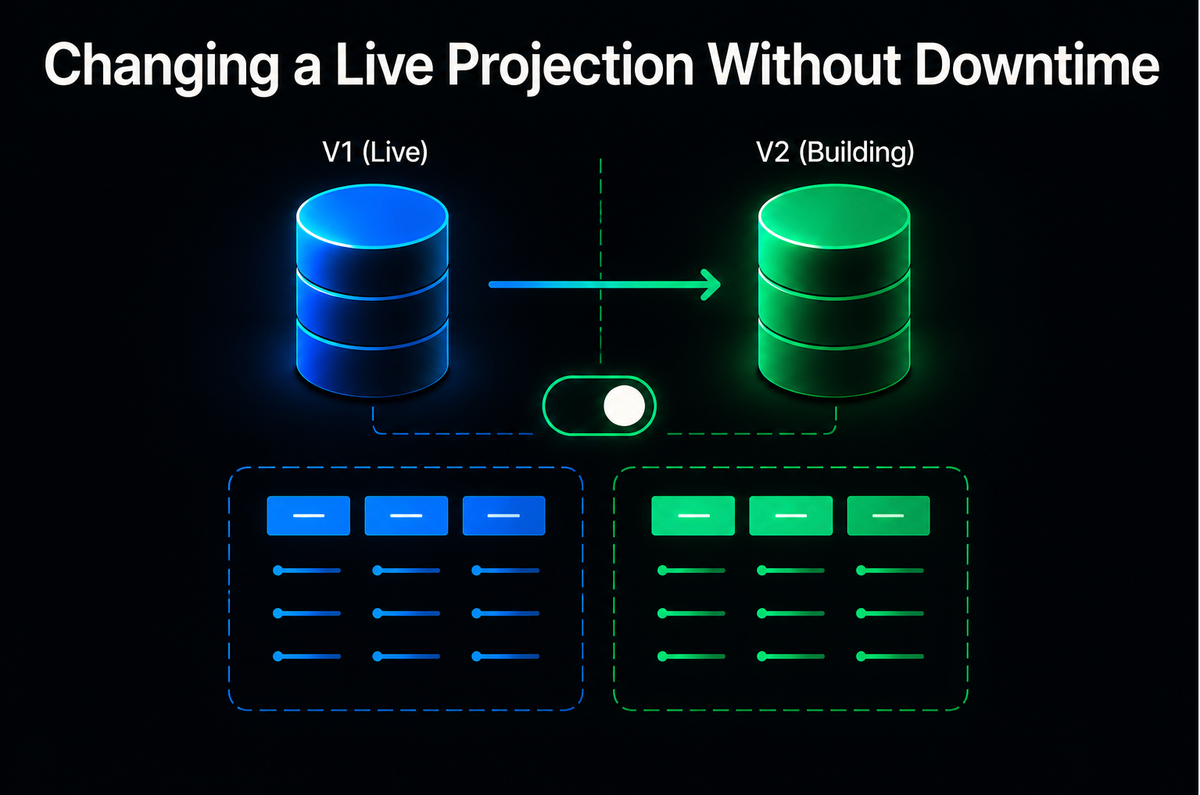
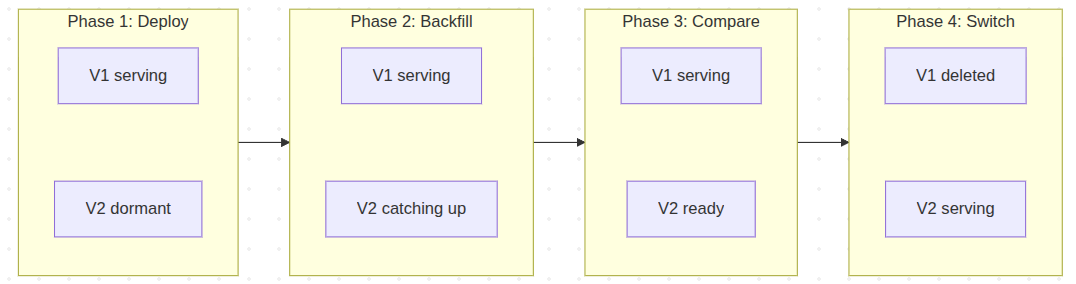
The idea is simple: deploy ticket_list_v2 alongside ticket_list_v1. Both read from the same Event Store. V1 keeps serving traffic while V2 catches up in the background. If V2 is wrong, V1 is untouched. No data loss, no corruption, no frantic hotfix at 2 AM.
It gives us ability to switch to V2 when we are ready, without any downtime.
Two attributes make this work. #[ProjectionDeployment] controls the deployment lifecycle:
#[ProjectionV2('ticket_list_v2')]
#[FromAggregateStream(Ticket::class)]
#[ProjectionDeployment(manualKickOff: true)]
class TicketListV2Projection
{
    // Updated handlers with the new priority column
}
manualKickOff: true means the projection will not auto-initialize on deployment — you control when it starts, when it backfills, and when it is promoted to serve traffic. Until then, V2 sits there as deployed code waiting for your command.
Dynamic Table Names
Here is the technique that makes blue-green projections elegant: V1 lives in one class, V2 extends it and only overrides what changed. Each class declares its own projection name through #[ProjectionV2(...)], and #[ProjectionName] injects that name into every lifecycle hook and event handler — so the same code path writes to its own table per version.
The V1 class declares the schema and the original handlers:
#[ProjectionV2('ticket_list_v1')]
#[FromAggregateStream(Ticket::class)]
class TicketListProjection
{
    public function __construct(protected Connection $connection) {}

    #[ProjectionInitialization]
    public function init(#[ProjectionName] string $projectionName): void
    {
        $this->connection->executeStatement(
            "CREATE TABLE IF NOT EXISTS {$projectionName} (
                ticket_id VARCHAR(36) PRIMARY KEY,
                status VARCHAR(25),
                priority VARCHAR(25)
            )"
        );
    }

    #[EventHandler]
    public function onTicketRegistered(
        TicketWasRegistered $event,
        #[ProjectionName] string $projectionName
    ): void {
        $this->connection->insert($projectionName, [
            'ticket_id' => $event->ticketId,
            'status'    => 'open',
            'priority'  => 'normal', // ← buggy: always 'normal'
        ]);
    }

    (...) // Many other handlers
}
V2 extends V1 and replaces only the handler that needed to change:
#[ProjectionV2('ticket_list_v2')]
#[ProjectionDeployment(manualKickOff: true)]
class TicketListV2Projection extends TicketListProjection
{
    #[EventHandler]
    public function onTicketRegistered(
        TicketWasRegistered $event,
        #[ProjectionName] string $projectionName
    ): void {
        $this->connection->insert($projectionName, [
            'ticket_id' => $event->ticketId,
            'status'    => 'open',
            'priority'  => $this->derivePriorityFrom($event), // ← correct logic
        ]);
    }
}
V2 inherits init, delete, and every other handler from V1. Only the one handler that needed fixing is overridden — the diff in code is the diff in behavior, and that is exactly what reviewers and tests should focus on.
And initialize each:
bin/console ecotone:projection:init ticket_list_v1

# V2 creates its fresh table independently.
bin/console ecotone:projection:init ticket_list_v2
Because each class declares its own projection name through #[ProjectionV2(...)], deploying both produces two completely separate tables. No conflicts. Both projections process the same events from the same Event Store, writing to independent storage. You can query both tables, compare row counts, spot-check edge cases — all while V1 continues serving production traffic.
Now you just have two tables, side by side, and you switch when you are ready. If V2 produces wrong results — wrong priority calculations, missing rows, whatever — V1 is completely untouched. Roll back by deleting V2. Done.
How V2 Catches Up to Real-Time
From here, the question that always comes up: V1 is moving forward in real-time while V2 is reading history from event zero. How does V2 ever catch up — and what happens when it does?
With both tables initialized, V2 is sitting at position zero — empty. You trigger the catch-up explicitly:
bin/console ecotone:projection:backfill ticket_list_v2
Each projection has its own independent position tracker. V1's position points somewhere near the current head of the event store. V2 starts at zero. Once the backfill command kicks in, V2 reads events in batches, applies them through your handlers, writes to ticket_list_v2, and commits the new position — all in one transaction per batch. Meanwhile, new events keep arriving, and V1 keeps consuming them in real-time.
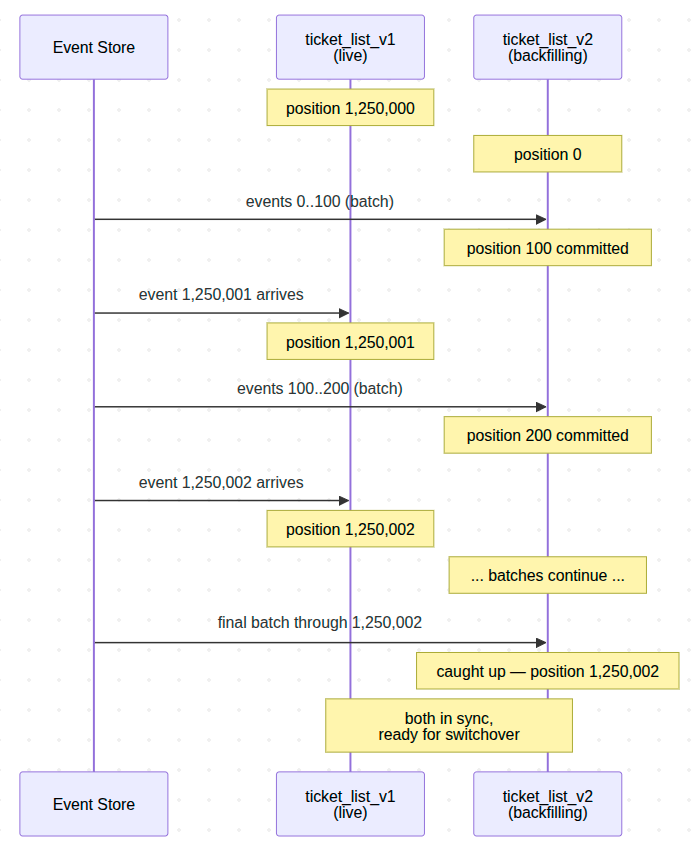
Three consequences worth understanding.
Ordering is not a problem. V1 and V2 both read the same events from the same store in the same order. The fact that V2 reads them later does not change what V2 sees. Both arrive at the same read-model state for the same input — V2 just gets there on a delay.
Failure during backfill is not catastrophic. Each batch commits position transactionally with the projection writes. If a worker dies mid-batch, the database rolls back the partial writes and the position stays at the last successful commit. Restart the worker and it picks up from there — no manual cleanup, no replay from zero.
It's worth to understand deeper reason for manualKickOff being introduced — without it, deploying V2 would let any other action in the system kick the projection into life: a worker booting up, an incoming event, a scheduled trigger. For a globally tracked projection that has to catch up on millions of events, that is exactly what you do not want. An async projection coming up unexpectedly can monopolise its queue for half an hour while it grinds through history, blocking every unrelated message behind it. manualKickOff: true makes V2 dormant until you decide it is time — initialization, backfill, and going live all become explicit, scheduled actions instead of side effects of a deploy.
Backfill — Catching Up a Brand-New Projection
Backfill populates a brand-new one that has never run before. You deploy a new projection class and need to catch it up with history.

To run backfill we would use console command:
bin/console ecotone:projection:backfill ticket_list_v2
The synchronous backfill reads events from position zero in configurable batches — reusing the same position-tracking mechanism from earlier in this series. After backfill completes, the projection is fully caught up and begins processing new events as they arrive. Simple, predictable, and perfectly fine for smaller event stores.
Async Backfill with Parallel Workers
For large event stores with millions of events, synchronous backfill may take too long. By setting asyncChannelName, the backfill command dispatches messages to a channel instead of processing inline.
#[ProjectionV2('ticket_list_v2')]
#[FromAggregateStream(Ticket::class)]
#[ProjectionBackfill(
    backfillPartitionBatchSize: 100,
    asyncChannelName: 'backfill_channel'
)]
class TicketListV2Projection
{
    // Same handlers as above
}
and then we would run backfill as follows:
# Dispatches backfill messages to the channel
bin/console ecotone:projection:backfill ticket_list_v2

# Start multiple workers for parallel processing
bin/console ecotone:run backfill_channel -vvv
And now the backfill will happen in the background.
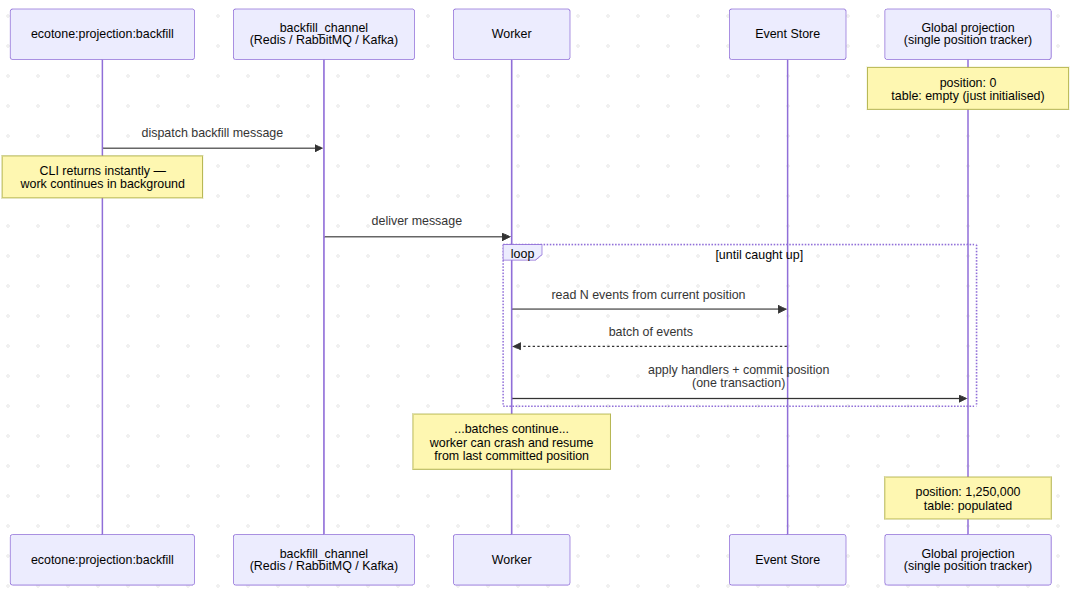
We can scale this process even more with partitioned projections, which we will discuss in a moment. But let's now take a look on the whole "switchover process".
The Switchover Workflow
Here is the step-by-step migration.
- Step 1 — Deploy V2 code with
#[ProjectionDeployment(manualKickOff: true)]. Nothing happens on deployment. V1 continues serving traffic normally. - Step 2 — Initialize V2. Create the V2 table:
bin/console ecotone:projection:init ticket_list_v2
This triggers the #[ProjectionInitialization] hook, creating the ticket_list_v2 table.
- Step 3 — Backfill V2. Populate V2 with all historical events:
bin/console ecotone:projection:backfill ticket_list_v2
- Step 4 — Compare. This is the step that earns its keep, and it deserves more than "query both tables." Row counts are a sanity check, not a verification. Real verification looks like this:
- Step 5 — Set V2 live. Remove
manualKickOff, deploy. V2 now processes new events as they arrive, just like any other live projection. - Step 6 — Switch traffic. Update your query handlers to read from
ticket_list_v2. - Step 7 — Delete V1:
bin/console ecotone:projection:delete ticket_list_v1
This triggers #[ProjectionDelete] which drops the ticket_list_v1 table and removes its position tracking.
You may wonder why manualKickOff is actually important here, it's crucial from context of globally tracked projections, as those have to go over whole event stream.
This means that we may need to catch hundreds or millions of events, and if such process would be accidentally called for async projection for example, it could block the queue for hours. With this we can run via dedicated CLI or dedicated rebuild channel, to avoid blocking any other parties.
Rebuild — When You Are Confident
Blue-green with two Projections is the safest path, but it is not free. Two tables means double storage during the migration. Backfill means double write throughput. Real verification means dedicated engineering time. When significant changes are made to projection logic, it is safer to use blue-green deployment, but when we are just fixing a bug in handler for example, it is often better to use rebuild.
If you fixed a bug in a handler and you are confident the fix is correct, you do not need to run two projections side by side. You just need to reset and replay.
bin/console ecotone:projection:rebuild ticket_list
The rebuild command triggers the reset hook, then replays all events from position zero — both wrapped in a single transaction so the projection never observes a half-reset, half-replayed state.
This calls #[ProjectionReset] first, then replays from position zero — and both run inside one transaction. That transactional guarantee is what makes rebuild safe: readers never see a partially-cleared table or a half-replayed state. But the scope of that transaction is what decides whether rebuild is viable for your projection.
Global Projections: Bounded by the Length of One Transaction
For a global projection, the #[ProjectionReset] hook clears the whole table — there is no per-aggregate scoping:
#[ProjectionV2('ticket_list')]
#[FromAggregateStream(Ticket::class)]
class TicketListProjection
{
    #[ProjectionReset]
    public function reset(#[ProjectionName] string $projectionName): void
    {
        $this->connection->executeStatement(
            "TRUNCATE TABLE {$projectionName}"
        );
    }
}
Without #[Partitioned], the reset hook truncates the entire projection table. Ecotone wraps that truncate and the full replay-from-zero in a single transaction.
The rebuild transaction has to cover the whole table — clear every row, then re-apply every historical event before committing. The projection table stays locked for the whole window. Readers either block waiting for the transaction to finish or, depending on isolation level, keep seeing the pre-rebuild data without any of the corrections applied.
For small projections with a few thousand events, the lock is brief enough that this may be perfectly acceptable. For large global projections, the transaction simply will not finish in any reasonable time — use blue-green instead. However for partitioned projections this solution is gold.
Partitioned Projections: One Aggregate per Transaction
Partitioned projections flip this constraint. Instead of one transaction covering the whole projection, Ecotone scopes the reset-plus-replay transaction to a single aggregate. Each partition is rebuilt independently, in its own short-lived transaction, while every other partition continues serving reads normally.
Because a single aggregate's event stream is small — tens or hundreds of events, not millions — each transaction completes quickly without blocking any changes along the way. The total work is the same as a global rebuild, but it is sliced into pieces small enough that no single transaction ever has to hold the whole projection hostage.
The mechanism is the #[ProjectionReset] hook receiving #[PartitionAggregateId], so the reset deletes one aggregate's data instead of truncating the table:
#[Partitioned]
#[ProjectionV2('ticket_details')]
#[FromAggregateStream(Ticket::class)]
#[ProjectionRebuild(partitionBatchSize: 50)]
class TicketDetailsProjection
{
    #[ProjectionReset]
    public function reset(
        #[PartitionAggregateId] string $aggregateId
    ): void {
        $this->connection->executeStatement(
            'DELETE FROM ticket_details WHERE ticket_id = ?',
            [$aggregateId]
        );
    }
}
The reset hook is partition-aware — it deletes one aggregate's rows. Ecotone wraps that delete and the subsequent replay of the aggregate's events in a single transaction, then moves to the next aggregate.
There is a second non-obvious win that matters even more under failure. If one aggregate fails unrecoverably during rebuild — a handler bug specific to that aggregate's event sequence, a corrupted snapshot, a constraint violation no other partition would hit — only that partition is blocked. The rest of the rebuild keeps going. You do not lose hours waiting for manual intervention before the next aggregate can be processed. You fix the failing handler (or the data), re-trigger the few partitions that failed, and the rebuild finishes. Compare that to a global rebuild where one bad event at hour eleven means starting over from event zero.
Scaling Rebuild with Async Workers
So far, partitioned rebuild already gives you short per-aggregate transactions and local failure recovery. But it still runs sequentially — one aggregate after another. For a projection with thousands or millions of aggregates, sequential is still hours of wall-clock time.
This is where asyncChannelName enters. Instead of processing partitions inline, Ecotone batches them into messages and dispatches them to a channel. Multiple workers consume the channel in parallel — each pulling a batch, rebuilding the aggregates in it, and committing.
#[ProjectionRebuild(
    partitionBatchSize: 50,
    asyncChannelName: 'rebuild_channel'
)]
partitionBatchSize: 50 packs 50 aggregate IDs into each message. asyncChannelName ships those messages to a channel rather than processing them in-process. The channel itself is whatever transport you have wired into Ecotone — Redis, RabbitMQ, Kafka, AMQP, SQS — the rebuild does not care which.
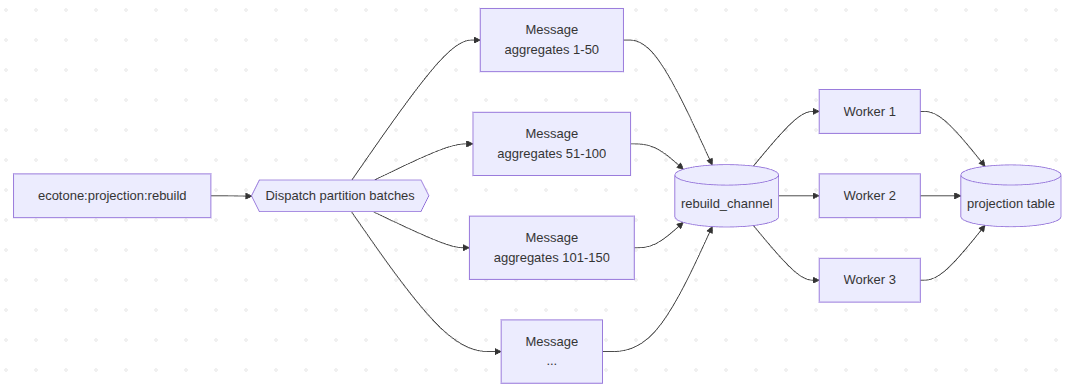
With 1,000 aggregates and partitionBatchSize: 50, Ecotone dispatches 20 messages. Three workers means three batches in flight at any moment; ten workers means ten. The total work is the same — 1,000 aggregates — but the rebuild finishes in three times less time than sequential.
Of course this scalable solution is not only for rebuild, and can be used for backfill the same way.
Series Conclusion
The promise of event sourcing has always been simple: your read model is just a function of your events. In practice that promise only holds if replay is cheap enough to actually run — otherwise teams quietly patch tables, batch changes into rebuild windows, and the foundation erodes one workaround at a time. The work across this series was about closing that gap. Once replay becomes a normal operation instead of a calendar event, projections finally behave like what they were always supposed to be: a view of your events you can throw away and rebuild on the same afternoon you find the bug.
That is the bar we built ProjectionV2 to clear. Pick the strategy that fits your change, ship the fix, and move on with the rest of your day.
That was the last article in the series on Ecotone's Projection System. Across the five parts we went deep — not just over the surface of #[ProjectionV2], #[Partitioned], #[ProjectionDeployment], #[ProjectionBackfill], but underneath them, into the mechanisms those declarative attributes are quietly orchestrating: position tracking, batch transactions, per-partition scoping, channel dispatch, lifecycle hooks.
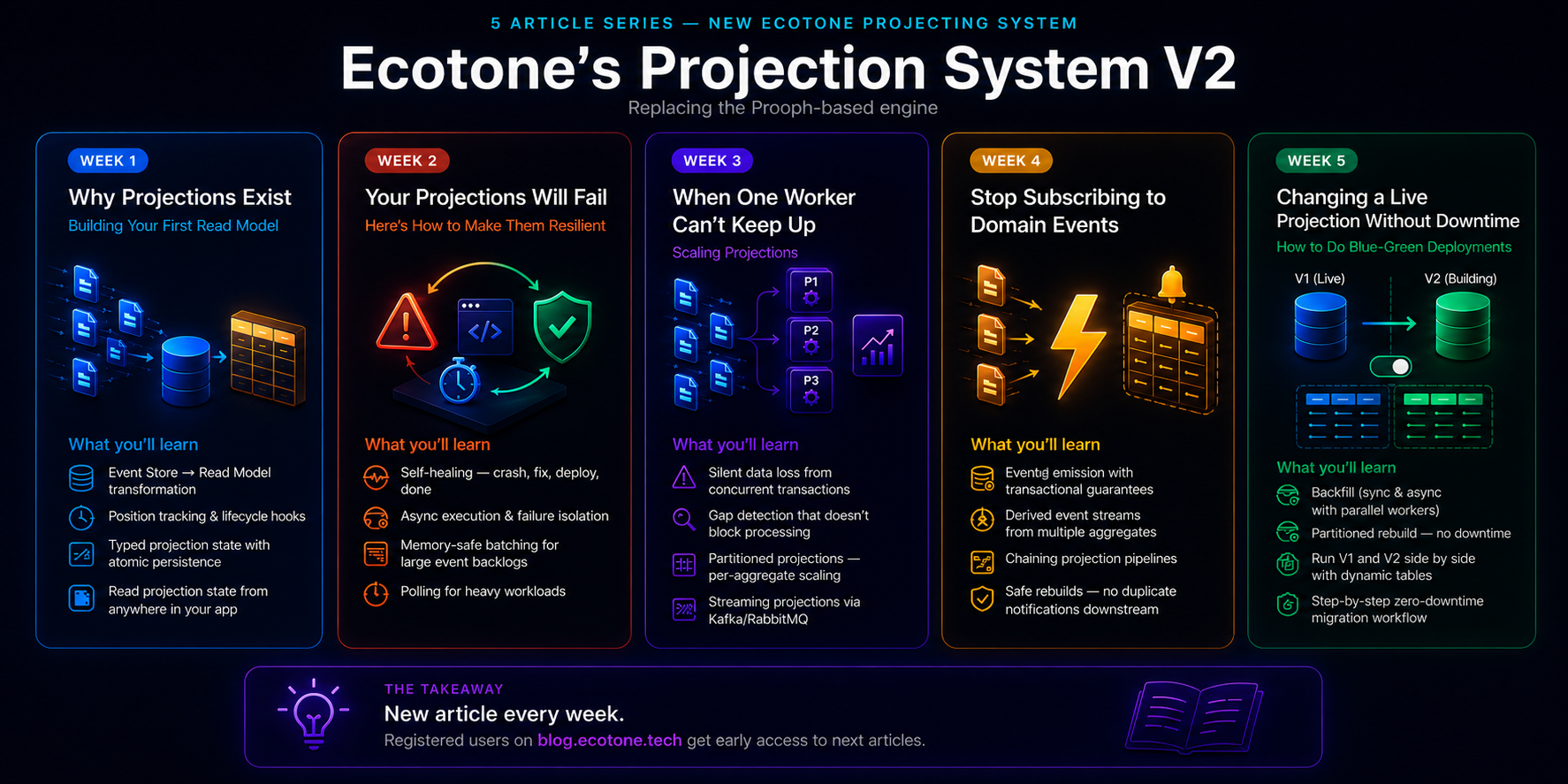
The aim of sharing those was to get people familar with different practices and solutions we've applied to Ecotone, and to show that those can actually be straight-forward to work with. I hope you've enjoyed the reading, and that you feel more confident now into using Event Sourcing in production ready systems.