Tempest + Ecotone: One Declarative Foundation
Tempest and Ecotone share one foundation — declarative configuration. Installing ecotone installs an architecture layer: CQRS, event sourcing, workflows and resilient async, with the whole messaging layer in to your Tempest App.

Updated on 2026-07-22
Tempest describes itself as a framework designed to get out of your way — you write application code, and discovery finds it. Ecotone sits one layer higher and makes the matching promise: full business focus — you write business logic, and the architecture wiring is handled. Those are two phrasings of one foundation idea, declarative configuration: you declare intent in code, and the framework derives everything else.
This article is about what happens when the two meet.
composer require ecotone/tempest does not add a dependency so much as install an architecture layer into the foundation. I did build a demo e-commerce application to show how this work in practice, and described the features and practices used in this article.
TL;DR: Tempest and Ecotone are built on the same foundation — declarative configuration. Tempest applies it to the application layer and gets out of your way; Ecotone applies it to the architecture layer and enables full business focus. composer require ecotone/tempest installs that layer into Tempest: CQRS, async processing with retries and a dead letter, event sourcing, projections, workflows, per-message delayed delivery, and an outbox with deduplication for free — and a runnable e-commerce demo shows what that looks like in practice.Table of contents
- One foundation: declarative configuration
- Installing the architecture layer
- The shop, concept by concept
- The count
- Transferable lessons
One foundation: declarative configuration
Ecotone now has a first-class integration for Tempest — a new package, ecotone/tempest (documentation). What makes this integration different from a typical framework adapter is that both sides already work the same way. In Tempest you write a controller, a model, a console command — discovery finds it, no registration. In Ecotone you write a class with #[CommandHandler] on a method — the framework finds it, builds the bus, routes the message, manages the transaction. Neither side asks you to describe your application to it; both derive the wiring from what you declared in code.
That shared foundation is why the composition looks like layers rather than glue:
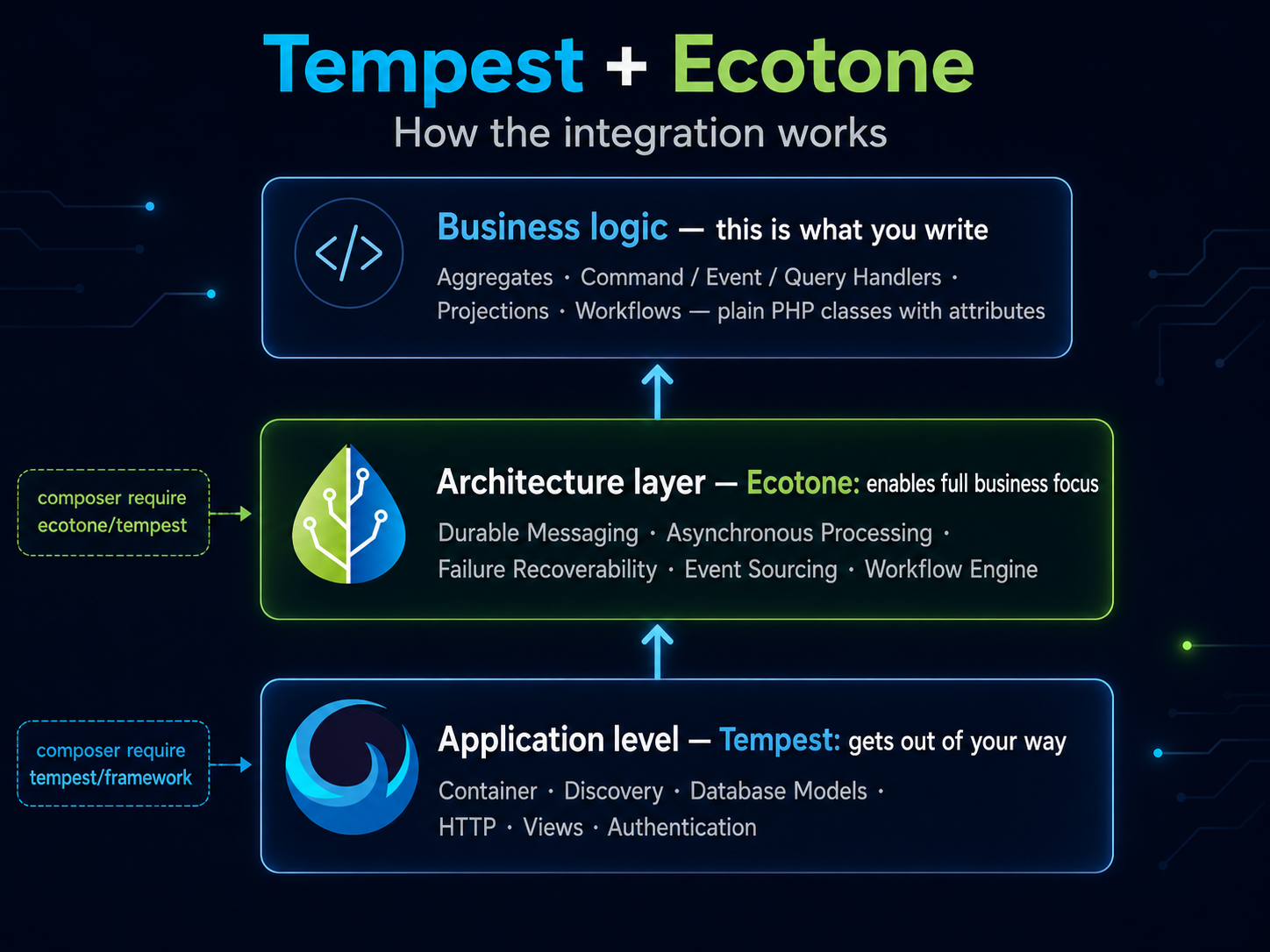
The result is checkable as a size claim: an application with enterprise-level messaging architecture where the application code holds business logic and almost nothing else. There is no configuration layer to minimize; it simply isn't there.
The entire setup:
composer require ecotone/tempest
One command. No service provider, no bundle registration, no YAML.
A config file exists, but it is optional — the composer require alone gives you a fully working integration. Claims like that are cheap on a slide, which is why everything below comes from a browsable shop rather than snippets: product grid, cart, checkout, orders dashboard, shipment tracking, real emails landing in a local inbox. The whole application is public — ecotoneframework/tempest-ecotone-demo — so you can clone it, run docker compose up, play with it, and count the classes yourself.
ecotone/tempest. The demo additionally uses ecotone/dbal, ecotone/pdo-event-sourcing and ecotone/jms-converter on Postgres.Installing the architecture layer
The diagram's middle layer is what the composer require actually delivers. Ecotone brings its whole platform — durable channels, retries with backoff, dead-lettering, per-message delayed delivery, a query bus, event sourcing — and every piece of it is declared the same way the foundation is: attributes on plain classes, discovered, never registered.
final class PlaceOrderHandler
{
    #[CommandHandler('order.place')]
    public function place(string $orderId): void
    {
        // store the order in the database
    }
}
A handler is a plain class with one attribute — discovered, routed and wrapped in a transaction without any registration.
Here is the full path a request takes, from the browser down to the stored order — and who owns each step:
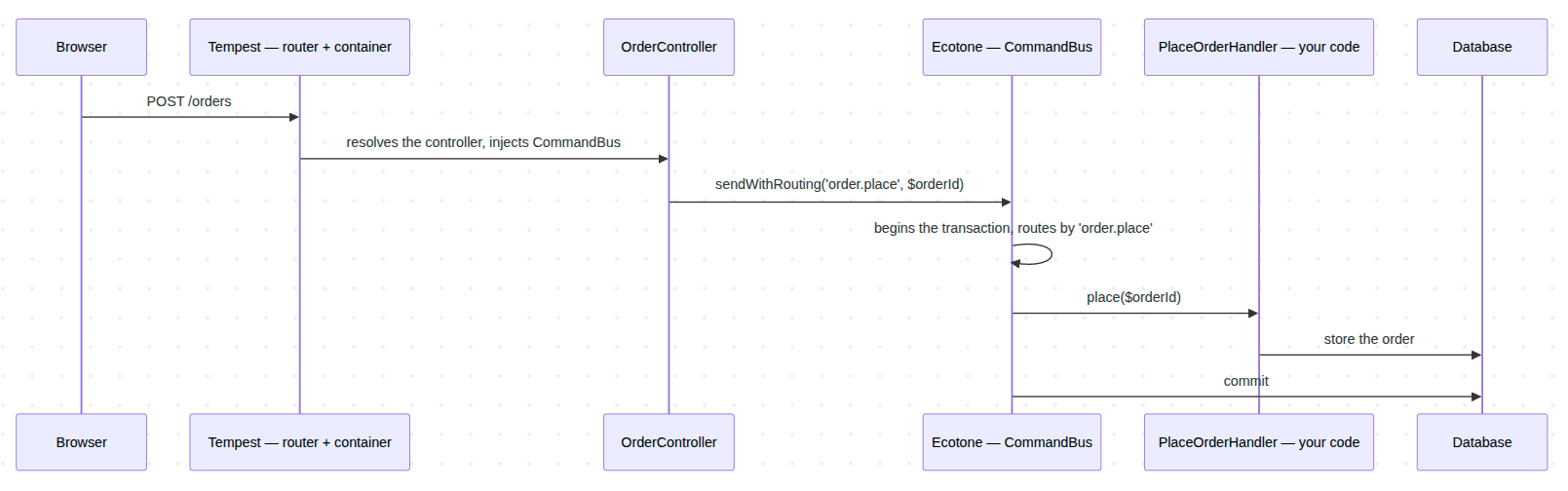
Tempest carries the request to your controller; Ecotone carries the command to your handler, inside a transaction; the only code you wrote is the controller call and the handler body.
Where does discovery get its scan paths? From what you already wrote. When no namespaces are configured, Ecotone derives them from Tempest's Composer object — the PSR-4 roots of your composer.json. The database connection comes from Tempest's own DatabaseConfig through TempestConnectionReference::defaultConnection(), so Ecotone's transactions wrap Tempest ORM writes on one shared PDO connection. You declared both things once; the integration reads them instead of asking again.
The buses arrive the same way. Every Ecotone gateway is injectable from Tempest's container with zero registration:
final class OrderController
{
    public function __construct(
        private CommandBus $commandBus,
    ) {}

    #[Post('/orders')]
    public function place(string $orderId): Redirect
    {
        $this->commandBus->sendWithRouting('order.place', $orderId);

        return new Redirect('/orders');
    }
}
Tempest does the dependency injection; Ecotone provides the gateways. QueryBus and EventBus inject the same way.
The split is clean. Tempest solves HTTP, DI, forms, database models, console. Ecotone adds, on top of the same models and the same container, the messaging layer an application needs when it grows.
The shop, concept by concept
What we are building: a shop where a customer browses products, fills a cart and checks out. The checkout records an order; stock drops immediately; a notification appears on the dashboard; a confirmation email arrives in the inbox; the warehouse prepares a shipment whose history is an event stream feeding the read model on screen; and thirty seconds after the shipment is dispatched, the customer gets a review request.
It is an ordinary-looking application, which is the point — here is the dashboard a user actually sees:
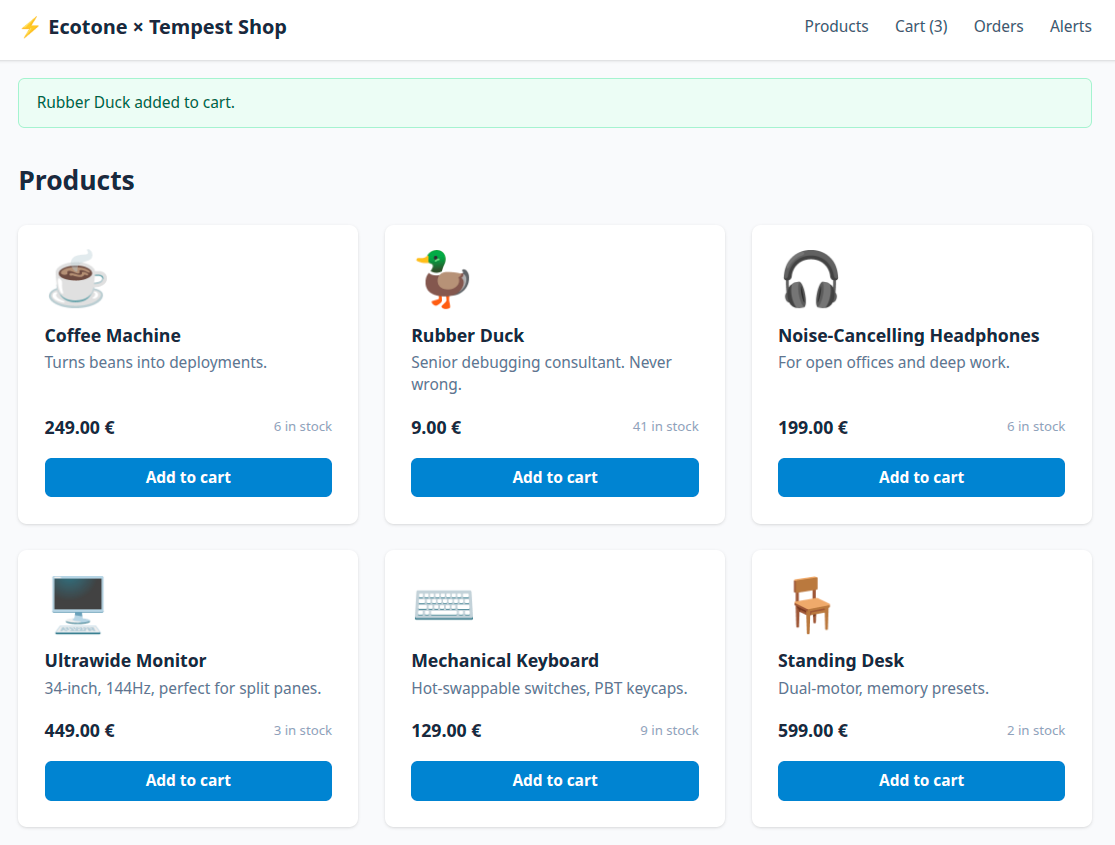
Every panel on that page comes from a different mechanism explained below: the tiles are a query, the shipments are a projection over an event stream, the notifications were written by a background worker. None of that is visible to the person clicking. One business flow, end to end:
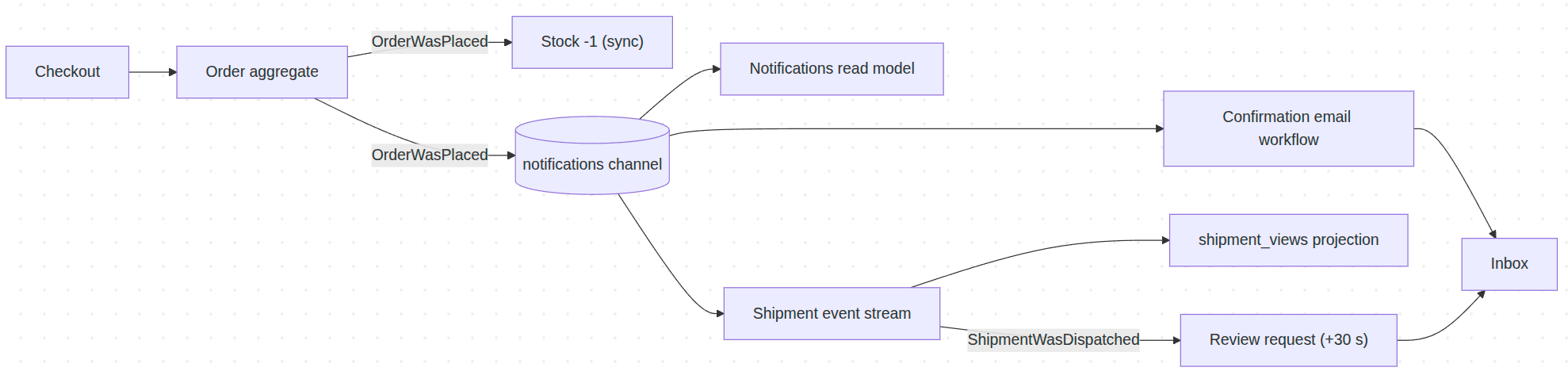
The whole flow. Each section below delivers one highlighted piece of it.
Installation
Rolling out Tempest was one command: composer create-project tempest/app app — a working skeleton with routing, views, console. Adding Ecotone was one more: composer require ecotone/tempest.
The aggregate is the Tempest model
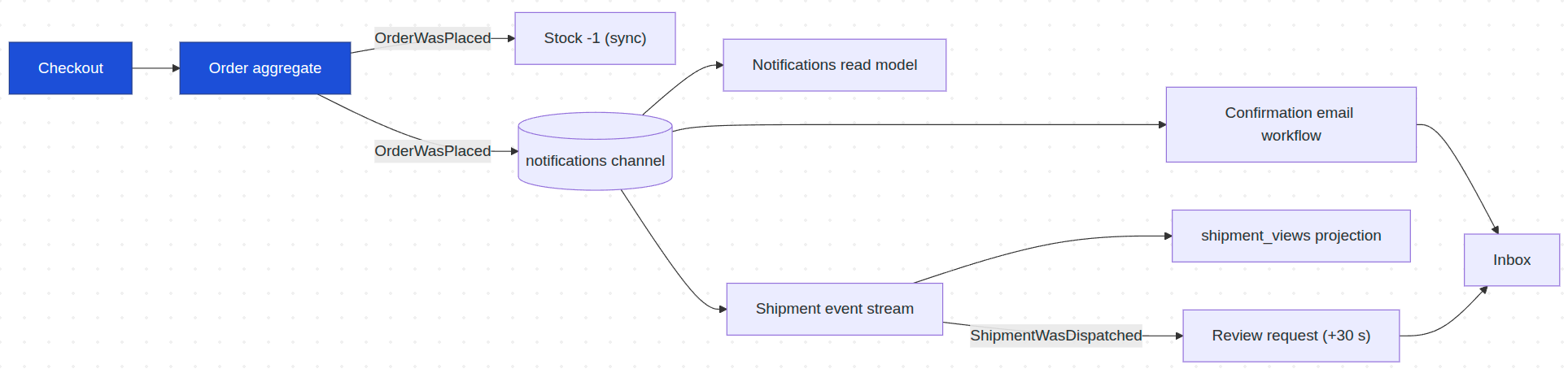
We are here.
Checkout needs somewhere to send PlaceOrder — and this is the strongest single moment in the integration, so look closely:
#[Aggregate]
final class Order
{
    use IsDatabaseModel;

    public PrimaryKey $id;
    public string $user_id;
    public int $total_price;
    public bool $is_cancelled;

    #[CommandHandler]
    public static function place(PlaceOrder $command): self
    {
        $order = new self();
        $order->user_id = $command->userId;
        $order->total_price = $command->totalPrice;
        $order->is_cancelled = false;
        $order->save();

        return $order;
    }

    #[IdentifierMethod('id')]
    public function getId(): int
    {
        return $this->id->value;
    }

    #[CommandHandler(routingKey: 'cancel_order')]
    public function cancel(): void
    {
        $this->is_cancelled = true;
    }

    #[QueryHandler('is_cancelled')]
    public function isCancelled(): bool
    {
        return $this->is_cancelled;
    }
}
One final class where both frameworks meet: #[Aggregate] from Ecotone, IsDatabaseModel from Tempest. The static place() factory is the creation handler — a command creates the aggregate, and save() goes through Tempest's own persistence.
Look at cancel(). It mutates state. That is all it does. No fetch, no save, no repository injection. Sending a command to it looks like this:
$orderId = $commandBus->send(new PlaceOrder(userId: 'user-1', totalPrice: 100));

$commandBus->sendWithRouting('cancel_order', metadata: ['aggregate.id' => $orderId]);

$queryBus->sendWithRouting('is_cancelled', metadata: ['aggregate.id' => $orderId]); // true
Ecotone loads the model by id, calls the handler, saves it back — through Tempest's own persistence.
There is no repository class to write. TempestRepository — Ecotone's built-in repository, shipped with the integration — makes any model using IsDatabaseModel usable as an aggregate directly. Checkout in the controller is three lines: build PlaceOrder from the cart, send it, redirect with the returned order id.
Event handler: subscribing to what happened
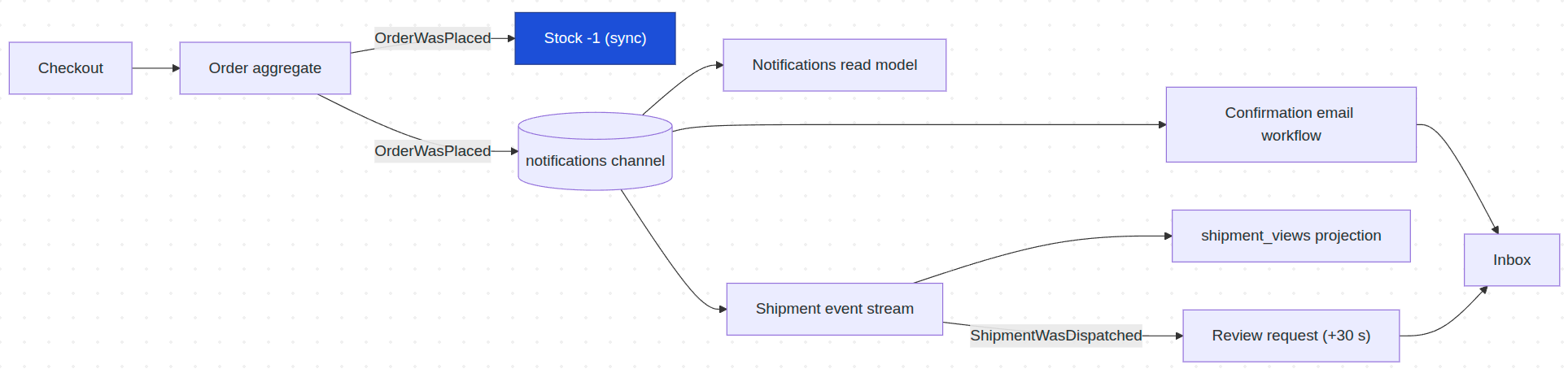
We are here.
The aggregate records OrderWasPlaced. Subscribing to it is one attribute on a plain class — this synchronous handler decrements stock in the same transaction as the order:
final class StockLevelUpdater
{
    #[EventHandler]
    public function whenOrderWasPlaced(OrderWasPlaced $event): void
    {
        foreach ($event->items as $line) {
            $product = Product::findById($line->productId);

            if ($product === null) {
                continue;
            }

            $product->stock = max(0, $product->stock - $line->quantity);
            $product->save();
        }
    }
}
No subscription config, no event map — the parameter type is the subscription.
Asynchronous event handler
We are here.
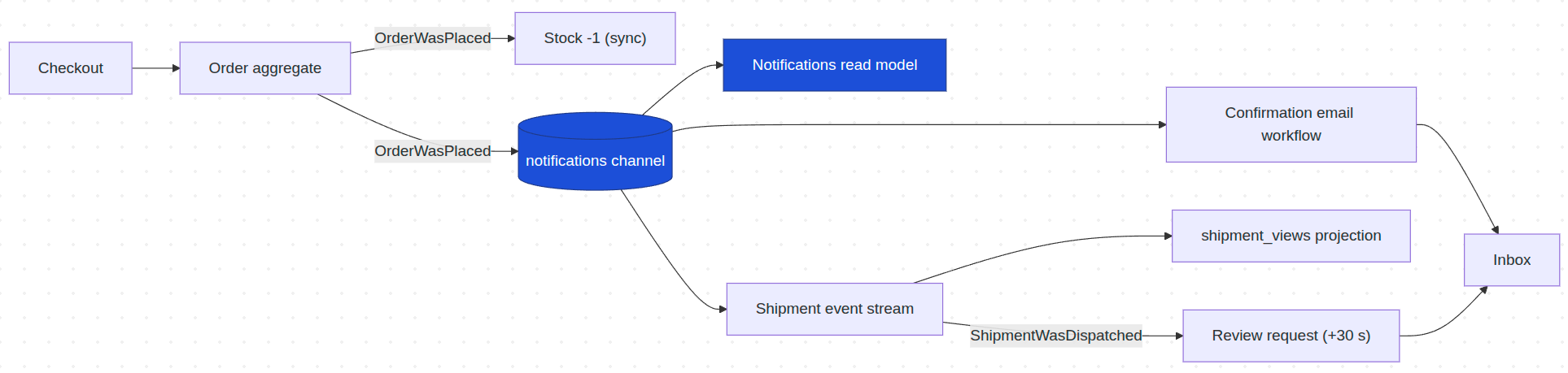
The same event also drives handlers that should not block checkout. Adding #[Asynchronous('notifications')] moves a handler to a background worker consuming a database-backed channel — the consistency model is chosen per handler:
final class NotificationRecorder
{
    #[Asynchronous('notifications')]
    #[EventHandler(endpointId: 'notification.order_placed')]
    public function whenOrderWasPlaced(OrderWasPlaced $event): void
    {
        Notification::create(
            message: sprintf('Order #%d placed by %s', $event->orderId, $event->customerName),
            type: 'order_placed',
        );
    }
}
One attribute picks the consistency model per handler.
And this is the moment the integration gets registered. The notifications channel the attribute refers to is declared in the application's only Ecotone configuration — one small class, two one-line methods: bridge Tempest's Postgres config into Ecotone, and declare the durable channel:
final class MessagingConfiguration
{
    #[ServiceContext]
    public function connection(): TempestConnectionReference
    {
        return TempestConnectionReference::defaultConnection();
    }

    #[ServiceContext]
    public function notificationsChannel(): DbalBackedMessageChannelBuilder
    {
        return DbalBackedMessageChannelBuilder::create('notifications');
    }
}
#[ServiceContext] methods are discovered like everything else. The channel runs on the same Postgres connection Tempest's models use.
Three async handlers hang off the same event: this one writes the notifications read model, one starts the confirmation-email workflow, one starts shipment preparation. The worker is Ecotone's own CLI entrypoint — ./tempest ecotone:run notifications — with no app code behind it.
Event sourcing and a projection
We are here.
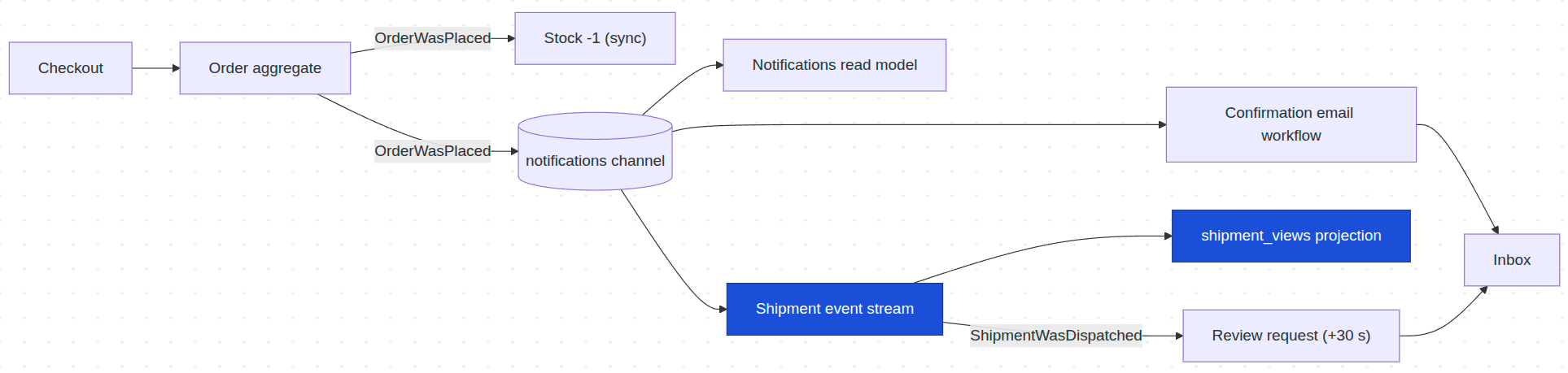
Shipment is an #[EventSourcingAggregate]: its state is not a table row but the stream of events in the Postgres event store. Command handlers return events; #[EventSourcingHandler] methods rebuild the state from them:
#[EventSourcingAggregate]
final class Shipment
{
    use WithAggregateVersioning;

    #[Identifier]
    private string $orderId;

    private string $customerName = '';

    private string $customerEmail = '';

    private bool $dispatched = false;

    #[CommandHandler]
    public static function prepare(PrepareShipment $command): array
    {
        return [new ShipmentWasPrepared(
            orderId: $command->orderId,
            customerName: $command->customerName,
            packageCount: $command->packageCount,
            customerEmail: $command->customerEmail,
        )];
    }

    #[CommandHandler(routingKey: 'shipment.dispatch')]
    public function dispatch(): array
    {
        if ($this->dispatched) {
            return [];
        }

        return [new ShipmentWasDispatched(
            orderId: $this->orderId,
            customerName: $this->customerName,
            customerEmail: $this->customerEmail,
        )];
    }

    #[EventSourcingHandler]
    public function applyPrepared(ShipmentWasPrepared $event): void
    {
        $this->orderId = $event->orderId;
        $this->customerName = $event->customerName;
        $this->customerEmail = $event->customerEmail;
    }

    #[EventSourcingHandler]
    public function applyDispatched(ShipmentWasDispatched $event): void
    {
        $this->dispatched = true;
    }
}
Handlers return events; state is rebuilt from the stream. The dispatched guard makes the Dispatch button idempotent — clicking twice records nothing twice.
The UI never reads the stream directly. A #[Projection] derives the read model — and the read model is a plain Tempest model:
#[Projection('shipment_list', Shipment::class)]
final class ShipmentListProjection
{
    #[EventHandler]
    public function whenShipmentWasPrepared(ShipmentWasPrepared $event): void
    {
        ShipmentView::create(
            order_id: $event->orderId,
            customer_name: $event->customerName,
            package_count: $event->packageCount,
            status: 'prepared',
        );
    }

    #[EventHandler]
    public function whenShipmentWasDispatched(ShipmentWasDispatched $event): void
    {
        $view = ShipmentView::find(order_id: $event->orderId)->first();
        $view->status = 'dispatched';
        $view->save();
    }
}
The projection writes ShipmentView — a Tempest IsDatabaseModel — so the dashboard queries it like any other table.
Workflow: async emails end to end
We are here.
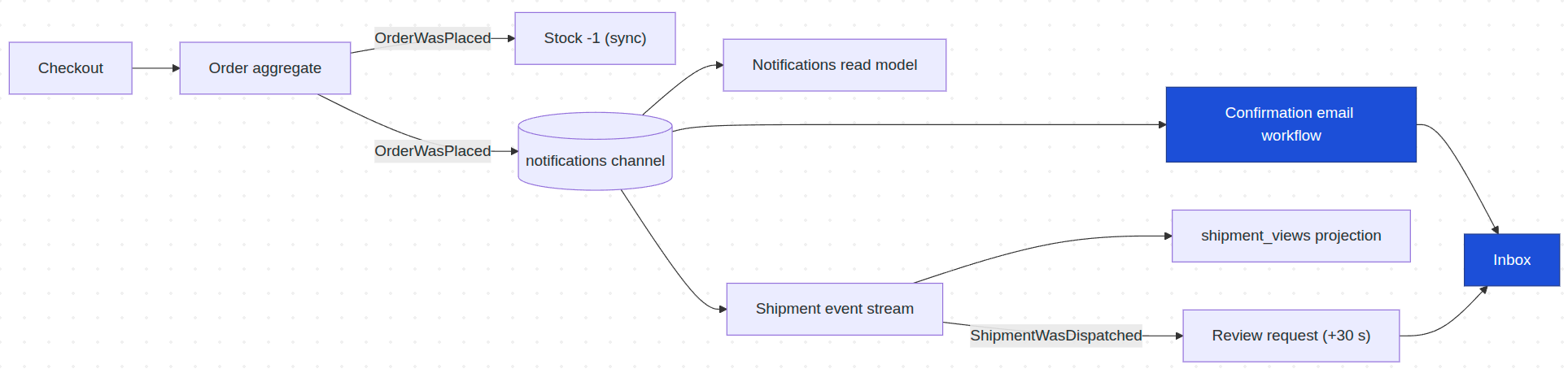
The email pipeline is three small steps connected by channel names, and each step owns exactly one concern. The event handler composes the CONTENT — and only the content. It does not know the recipient; it passes the notification forward with the id needed to find out:
#[Asynchronous('notifications')]
#[EventHandler(endpointId: 'order_confirmation.start', outputChannelName: 'notification.enrich')]
public function start(OrderWasPlaced $event): EmailNotification
{
    return new EmailNotification(
        orderId: (string) $event->orderId,
        subject: sprintf('Order #%d confirmed', $event->orderId),
        html: /* ...items and total rendered to HTML */,
    );
}
Content and an id. No recipient, no mailer, no bus.
The next step enriches the message HEADERS with the account details. With changingHeaders: true, the returned array is merged into the headers while the payload passes through untouched:
final readonly class AccountDetailsEnricher
{
    #[InternalHandler(
        inputChannelName: 'notification.enrich',
        outputChannelName: 'email.send',
        changingHeaders: true,
    )]
    public function enrich(EmailNotification $notification): array
    {
        $order = Order::findById((int) $notification->orderId);

        return [
            'customerEmail' => $order->customer_email ?? '',
            'customerName' => $order->customer_name ?? '',
        ];
    }
}
A pipeline step that only adds knowledge. The payload flows on unchanged.
And the last step is a prepared building block: it reads the payload plus the enriched headers, builds the GenericEmail, and sends through Tempest's own Mailer:
#[InternalHandler(inputChannelName: 'email.send')]
public function send(
    EmailNotification $notification,
    #[Header('customerEmail')] ?string $customerEmail,
    #[Header('customerName')] ?string $customerName,
    Mailer $mailer,
): void {
    if ($customerEmail === null || $customerEmail === '') {
        return;
    }

    $mailer->send(new GenericEmail(
        subject: $notification->subject,
        to: $customerEmail,
        html: sprintf('<p>Hi %s!</p>', $customerName) . $notification->html,
    ));
}
The send block never changes — any notification in the application can flow through it. The delayed review request in the next section reuses this exact chain.
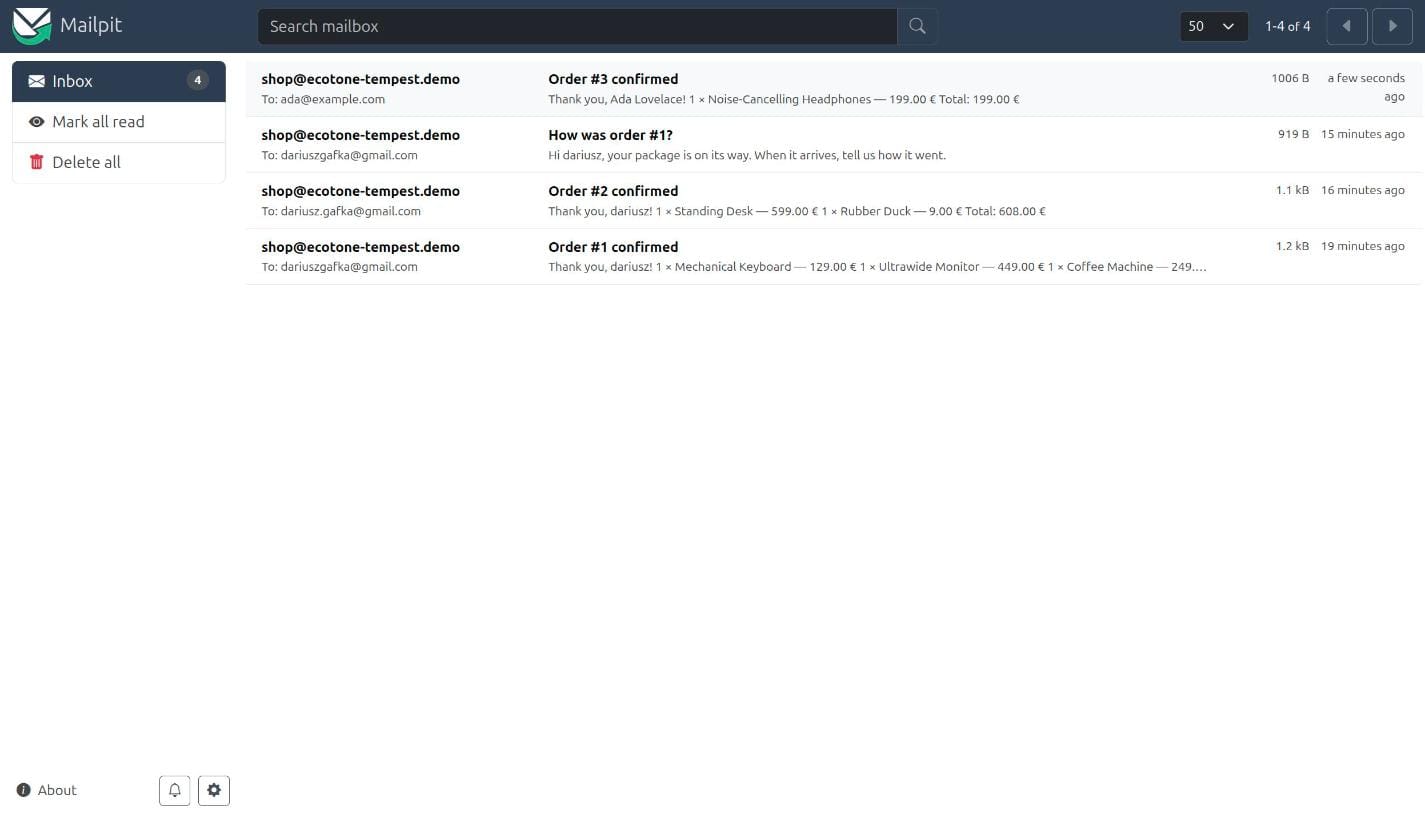
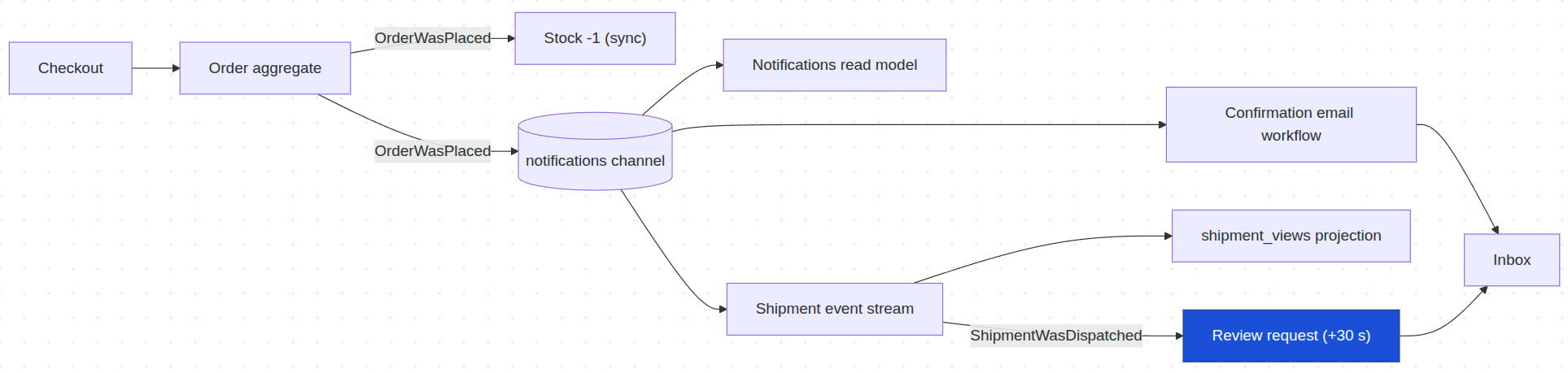
And the end of the chain is a real email, sent by the background worker through Tempest's Mailer — here caught by Mailpit, next to the delayed review request from the section below:
Delayed messages
We are here.
Thirty seconds after a shipment is dispatched, the customer gets a review request. This is not a recurring job for a scheduler: it is one specific message, due once, thirty seconds after its own trigger. It waits inside the durable channel — surviving worker restarts — and is released when due:
#[Delayed(new TimeSpan(seconds: 30))]
#[Asynchronous('notifications')]
#[EventHandler(endpointId: 'review_request.on_shipment_dispatched', outputChannelName: 'notification.enrich')]
public function requestReview(ShipmentWasDispatched $event): EmailNotification
{
    return new EmailNotification(
        orderId: $event->orderId,
        subject: sprintf('How was order #%s?', $event->orderId),
        html: '<p>Your package is on its way. When it arrives, tell us how it went.</p>',
    );
}
One attribute replaces the scheduler — and the whole delayed email is eight lines of content, because enrichment and sending come from the pipeline it flows through.
When the mail step fails: retries, dead letter, alerts page
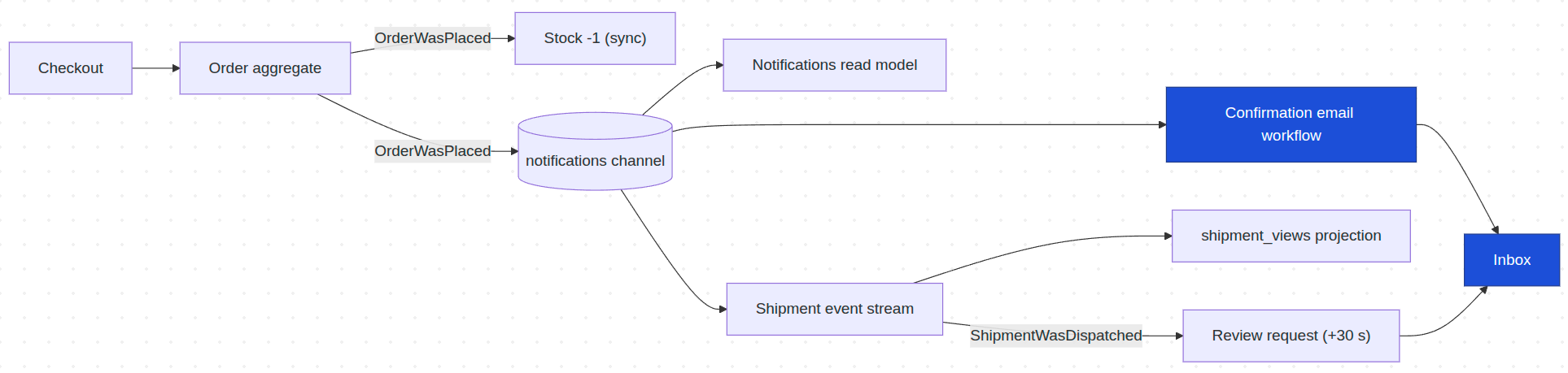
We are here — the one step in this flow that talks to the outside world, and therefore the one that fails.
The checkout form has a "simulate an email delivery failure" checkbox:
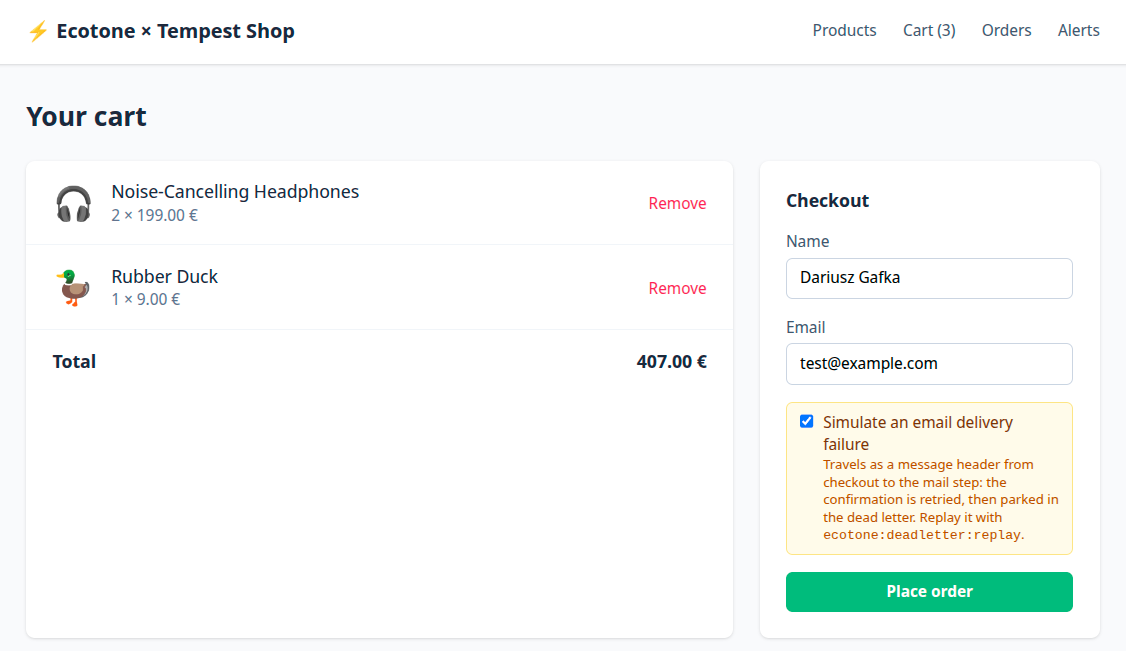
It is sent as metadata on the command, and that metadata propagates automatically in Ecotone. Therefore without any additional code we catch it in Event Handler sending Mail and do simulated failure.
Tick it and the send throws. The message is retried after one second, retried again after three, and then parked in a database-backed dead letter with its stacktrace. The order placed right behind it, without the box ticked, gets its email immediately — same channel, no blockage, and the worker keeps running. That behavior is a third #[ServiceContext] method on the same config class from earlier:
#[ServiceContext]
public function errorHandling(): ErrorHandlerConfiguration
{
    return ErrorHandlerConfiguration::createWithDeadLetterChannel(
        'errorChannel',
        RetryTemplateBuilder::exponentialBackoff(initialDelay: 1000, multiplier: 3)
            ->maxRetryAttempts(2),
        'dbal_dead_letter',
    );
}
No retry loops in handlers, no dead-letter migration, no supervisor watching the worker.
Recovery is a console command, because Ecotone's commands are discovered by Tempest like any other:
./tempest ecotone:deadletter:list       # what is parked, when it failed, why
./tempest ecotone:deadletter:show <id>  # full payload and stacktrace
./tempest ecotone:deadletter:replay <id>
But operations work is not always CLI work, and this is where the layering pays off again: the dead letter is not a private mechanism, it is a service. DeadLetterGateway injects into any Tempest controller, so the demo turns it into a page:
final readonly class AlertsController
{
    public function __construct(private DeadLetterGateway $deadLetter) {}

    #[Get('/alerts')]
    public function index(): View
    {
        return view('./alerts.view.php', errors: $this->deadLetter->list(limit: 50, offset: 0));
    }

    #[Post('/alerts/{messageId}/replay')]
    public function replay(string $messageId): Redirect
    {
        $this->deadLetter->reply($messageId);

        return new Redirect('/alerts');
    }
}
Two routes and a view. Each entry is an ErrorContext — message id, failure time, exception class and message, file, line, stacktrace — so the template has everything an operations screen needs.
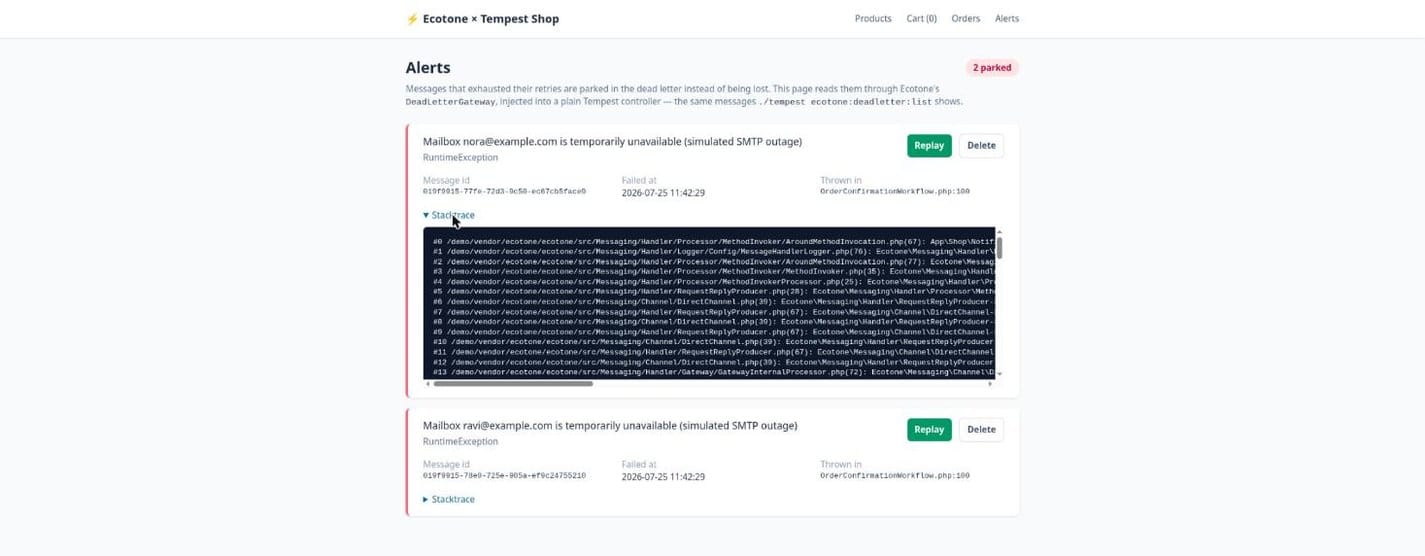
One detail worth stealing even if you never use this page: a replayed message carries the header ecotone.dlq.message_replied, readable as a normal #[Header] parameter. Recovery can therefore behave differently from the first attempt — skip a step that already succeeded, relax a guard, tag the result. A handler gets to see how a message reached it, not only what it carries.
Outbox and deduplication
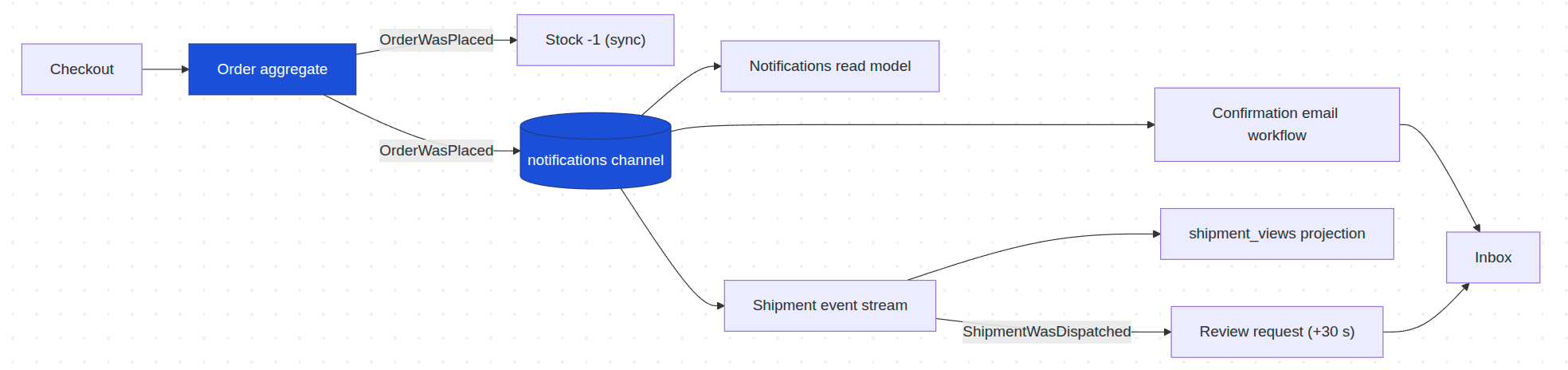
We are here.
Stop the worker and place an order. The order row and its event messages are committed in the same Postgres transaction, because the channel is database-backed — select count(*) from enqueue where queue='notifications' shows them waiting. Start the worker; the table drains and the emails go out. The dual-write problem ("order saved, event lost") cannot happen here, and nothing was configured to make that true. Redelivered messages are skipped through the ecotone_deduplication table — also zero code.
Multi-tenancy
Beyond this flow, the package also covers tenant separation. When you need it, a single message header routes commands, queries, transactions and business-interface SQL to the right tenant database:
$commandBus->send(new RegisterCustomer(1, 'John Doe'), metadata: ['tenant' => 'tenant_a']);
$commandBus->send(new RegisterCustomer(2, 'John Doe'), metadata: ['tenant' => 'tenant_b']);

$queryBus->sendWithRouting('customer.getAllRegistered', metadata: ['tenant' => 'tenant_a']); // [1]
Tenant routing decided by one metadata header, and is automatically propagated to asynchronous flows.
The count
The application's entire messaging layer:
- one state-stored aggregate (
Order) - one event-sourced aggregate (
Shipment) - commands and events as plain readonly objects
- four event handlers
- one projection
- one query service
- one workflow, plus the enrichment step it flows through
- one config class: connection, channel, error handling
That is about a dozen small classes. Everything else in the codebase is Tempest UI: controllers, views, a session cart — including the alerts page, which is two routes on top of DeadLetterGateway. There is no custom worker command, no repository, no serializer configuration, no queue wiring. The architecture list reads like a system that needs a platform team; the diff reads like a weekend project.
The count also survived the resiliency additions. Retries with dead-lettering came in as one #[ServiceContext] method on the existing config class; the delayed review email is one method on the existing workflow class; the outbox and deduplication needed no code at all. The feature list grew, the class list did not.
Transferable lessons
- Declarative + declarative composes; imperative + declarative fights. The integration is thin because neither side adapts to the other's philosophy. When picking tools to combine, alignment of principles matters more than feature lists.
- Zero config means reading what the app already declares. PSR-4 roots, database config — the developer wrote them once; the integration derives from them instead of asking twice.
- A framework choice does not have to mean an ecosystem ceiling. The "good fit, once more mature" objection assumes every capability must come from the framework's own ecosystem. A portable architecture layer breaks that assumption: the same Ecotone code runs on Laravel, Symfony, and now Tempest.
- Enterprise-grade is a property of the architecture, not the amount of code. Transactions shared with the ORM connection, dead-letter support, tenant routing — none of it written by the application.
Wrapping up
Tempest gaining CQRS is the small news. The bigger news is what two discovery-based frameworks make possible when composed: an enterprise-level feature list carried by application code that holds only business logic. If you have been telling yourself that this architecture is for teams with a platform group, count the classes again.
About the author: Dariusz Gafka is a Software Architect and author of the Ecotone Framework. He writes about event sourcing, CQRS, and PHP architecture patterns.